
Connect SERP evidence, competitor review, and position tracking
Keep the definitions of keyword metrics at hand when deciding what a search-result snapshot can explain.
A dated SERP observation
Layered competitor evidence
A controlled measurement series
Choose the evidence layer before requesting data
SERP evidence, competitor intelligence, and position tracking answer different questions. A requested SERP snapshot records what appeared for a keyword in a defined search context. Competitor surfaces aggregate domains and, when deliberately requested, add domain-level or ranked-keyword data. Tracking repeats a controlled measurement on a schedule and keeps a run ledger.
They can build on one another without becoming the same dataset. A current snapshot can reveal a ranking domain, the competitor catalog can preserve that domain for review, and tracking can later measure your own domain for an approved set. Each layer keeps its own scope, date, cost path, and missing states.
| Question | Use |
|---|---|
| What does the result page show now? | One-time SERP request |
| Which domains recur across this workspace evidence? | Competitor catalog and SERP overlap |
| What wider organic or paid footprint does one domain have? | Requested domain profile or deep analysis |
| How does our measured position change in a fixed context? | Position tracking schedule |
| Did the request run, finish, fail, or consume balance? | Activity and the tracking run log |
Request a SERP only when the result environment can change the decision
A one-time SERP request is appropriate when you need the observed top results, supported result features, your configured domain's position, ranking URLs, or a dated basis for competitor overlap. It is more useful for a focused shortlist than for an unreviewed inventory whose relevance is still uncertain.
The request is paid external work. Confirm the normalized keywords, location, language, acquisition mode, rows that still need data, cache hits, estimate, and balance before enqueueing. The current UI can process large selections in bounded chunks, but a technically accepted batch is not proof that every keyword returned data.
- Start with rows where the actual result types or ranking pages affect page choice.
- Use Only missing data when the selected set mixes complete and incomplete rows.
- Fresh cached rows are skipped unless you deliberately force replacement.
- A forced refresh can spend balance without producing a materially different decision.
- Review requested, completed, no-data, failed, and cached counts after the job.
Choose delivery mode by deadline and evidence need
Live, Priority, and Standard modes can return the current SERP fields used by the product, but they trade delivery time against estimated cost. Historical mode requests monthly observations for a selected 3, 6, 9, or 12-month range and writes position history rather than pretending an old result page is current.
Read the current estimate in the confirmation because prices, selected rows, cache reuse, and historical range affect the reservation. Live is not more accurate merely because it is faster, and Standard is not stale merely because it uses an asynchronous provider queue. Historical observations also need their own dates when compared with a current snapshot.
| Mode | Use it when |
|---|---|
| Live | The current result is needed in the active review |
| Priority | A faster queued result justifies the displayed premium |
| Standard | Cost matters more than immediate delivery |
| Historical | A dated position series is more useful than another current snapshot |
SERP Features describes detected modules in one requested snapshot
The field can record supported modules such as AI Overview, Featured Snippet, People Also Ask, Local Pack, image and video packs, Shopping, Knowledge Panel, Site Links, Top Stories, social packs, Jobs, and FAQ markup. These flags are opt-in SERP data. They are not fetched automatically for every keyword in the database.
A flag means the module was detected in that market, language, device, and collection context at that time. It does not prove that your domain owns the feature or quantify the clicks it changes. Features can move or disappear, so inspect the actual snapshot and date before changing a page or forecasting click potential.
To compare whole domains rather than one result page, move to Competitive Research with a clear comparison question.
Read the observed top results before assigning a cause
The top results can show ranking domains, URLs, positions, and link or feature context available from the selected request. Use them to compare page types, search tasks, recurring domains, and whether your own domain appears. A snapshot does not explain why a page ranks, whether the page satisfies every user, or which change would displace it.
Keep market, language, device, collection time, and requested depth attached to the observation. A domain missing from the acquired range is not the same as a verified absence from all results. Repeated same-day observations can update the daily record rather than create an intraday time series, so use the stored dates instead of inferring a monitoring frequency from row count.
The competitor catalog begins with workspace evidence and explicit domains
Domains observed across stored SERPs can be summarized by the number of covered keywords, top-10 appearances, covered volume, average best position, best position, and gaps where the competitor appears in the top 10 while the configured own domain does not. The score is a deterministic catalog ordering signal, not a market-share estimate or proof that the company competes for the same customers.
Manually tracked competitor domains can appear before SERP or paid profile data exists. Confirm a real competitor when the relationship has been reviewed, hide an irrelevant domain when appropriate, and retain the source distinction. News sites, directories, marketplaces, and platforms can rank repeatedly without being commercial peers.
Separate SERP overlap, domain profile, and deep analysis
The competitor dossier combines several layers without making them interchangeable. SERP overlap comes from the workspace's stored result evidence. Domain Profile is a paid aggregate request for organic and paid keyword counts, estimated traffic volume, a traffic-cost proxy, movement counters, and position bands. It does not return keyword rows.
Deep Analysis is a separate paid ranked-keyword request at a chosen maximum depth of 100, 500, 1,000, 5,000, or 10,000 rows. The interface shows requested depth, stored row count, and provider total where available. A capped result is not the domain's complete inventory, and estimated traffic or cost fields are provider estimates rather than Analytics or advertising-account data.
| Dossier layer | What it owns |
|---|---|
| From your SERPs | Workspace overlap, observed ranks, URLs, and gap context |
| Domain Profile | One aggregate organic and paid footprint snapshot |
| Deep Analysis | Requested ranked-keyword rows up to the selected depth |
| All Keywords | A merged review surface for available dossier rows |
Paid competitor data stays a review artifact until you import it
A Domain Profile or Deep Analysis follows estimate, balance reservation, external execution, settlement on actual provider cost, and release of unused reservation. Fresh results can be reused under the current cache policy unless a forced rerun is justified. Running, done, and failed states belong to that requested operation.
Deep Analysis rows remain attached to the competitor dossier. They do not automatically become Keyword Database records, a list, a brief, or an editorial task. Select and import the terms you have reviewed. Existing normalized records remain deduplicated, and an import should carry available provenance and metrics without silently replacing the decision that owns the destination list.
Use a direct selection or a list for the tracking cohort
A SERP tracking schedule can be created for a fixed direct selection of normalized keywords or for a named list. A direct selection stays tied to those stored terms. A list-backed schedule resolves current membership when a run is claimed, so terms added before that claim join the run and terms removed beforehand do not.
Once a run has been claimed, its requested count remains the run's starting scope. It does not chase edits made while the worker is active. Use a direct selection for a small fixed cohort and a list when deliberate membership changes should affect future runs. The schedule does not assign a page, owner, or editorial status by itself.
Position is a dated observation for one domain and SERP context
Position is the latest stored organic rank for the configured own domain and keyword in the available location, language, device, depth, and collection context. A blank value can mean no measurement, no matching result within the acquired depth, unavailable data, or missing own-domain configuration. It is not position zero.
Compare positions only when those context fields are compatible. A desktop observation from one country is not the mobile rank in another. The value records where the domain was observed, not why it moved, how much traffic it received, or whether the ranking URL is the page the team intended.
Position Change compares two usable observations
The field compares the current stored position with the preceding usable observation in the same supported context. Because a smaller rank number is better, read the displayed direction, prior value, and both dates. A missing previous observation leaves the change unknown rather than zero.
Movement may come from ordinary SERP volatility, a different ranking URL, a lost result, a measurement gap, or a real performance shift. Check the underlying observations, SERP Dynamics, ranking URL, result features, and relevant site events before assigning a cause or opening work.
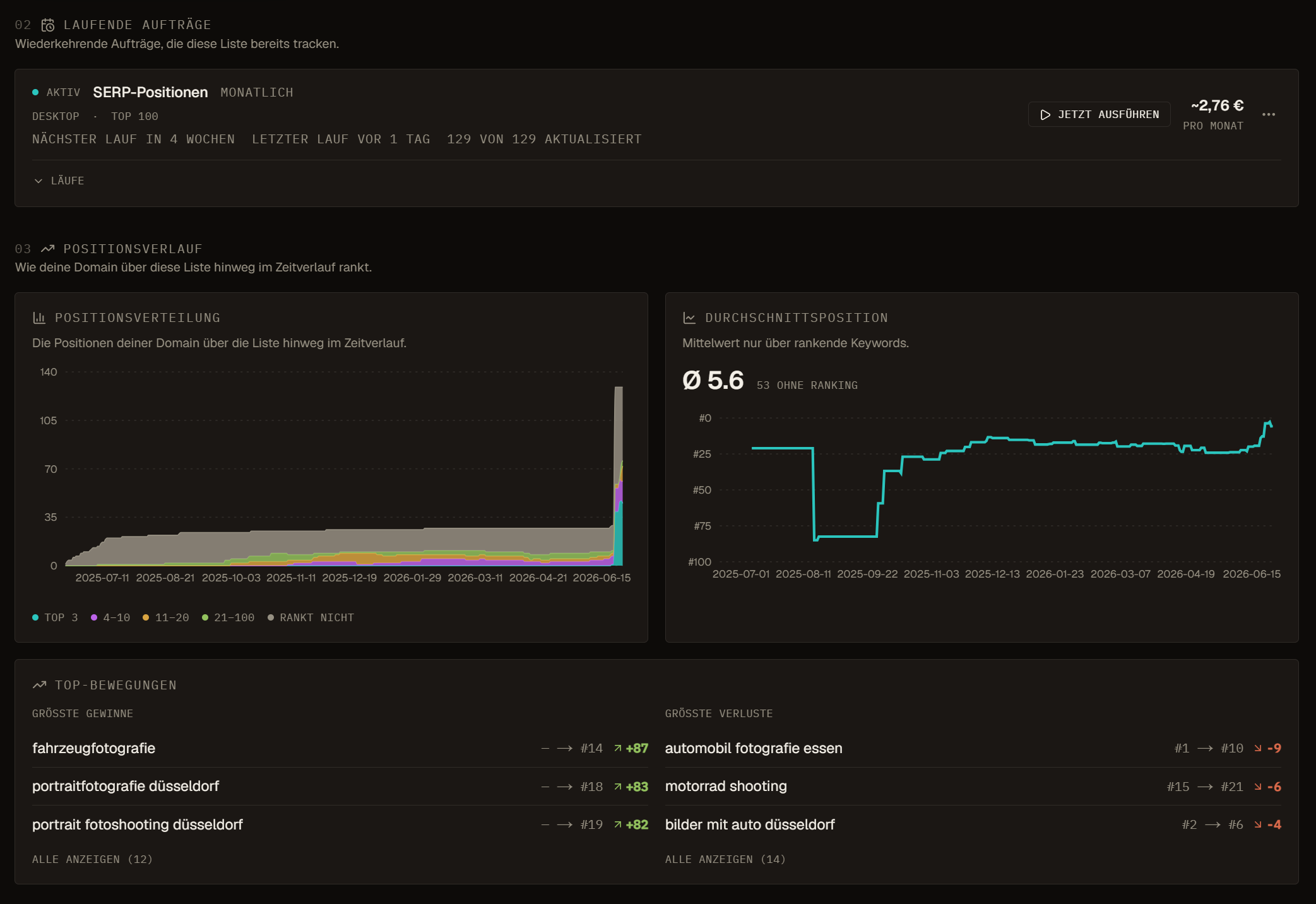
Position Trend shows the shape of the stored series
The trend helps separate an isolated jump from repeated gains, losses, reversals, or gaps. It is built from acquired snapshots for the keyword and configured domain context. Missing days are not silently filled as unchanged positions.
Use the line to decide where a closer timeline review is worthwhile. Do not use it as causal proof for a release, content update, technical fix, or link campaign. Align snapshots with dated site events and inspect whether the observed ranking URL remained the same.
Position History keeps current, scheduled, and backfilled observations distinct
Current one-time SERP requests, scheduled tracking, and historical backfills can all contribute dated rank snapshots with their source. Historical delta fields compare the latest observation with a usable point near 3, 6, 9, or 12 months earlier. If the comparable basis is absent, the delta stays blank.
Top-10 domains can appear in the series while they remain in the observed top 10, whereas explicitly tracked domains can retain gaps when no rank is found. Historical charts may also show estimated clicks or traffic value based on stored volume and a fixed click curve. Those are modeled values, not analytics sessions or revenue.
A tracking schedule needs a reproducible measurement contract
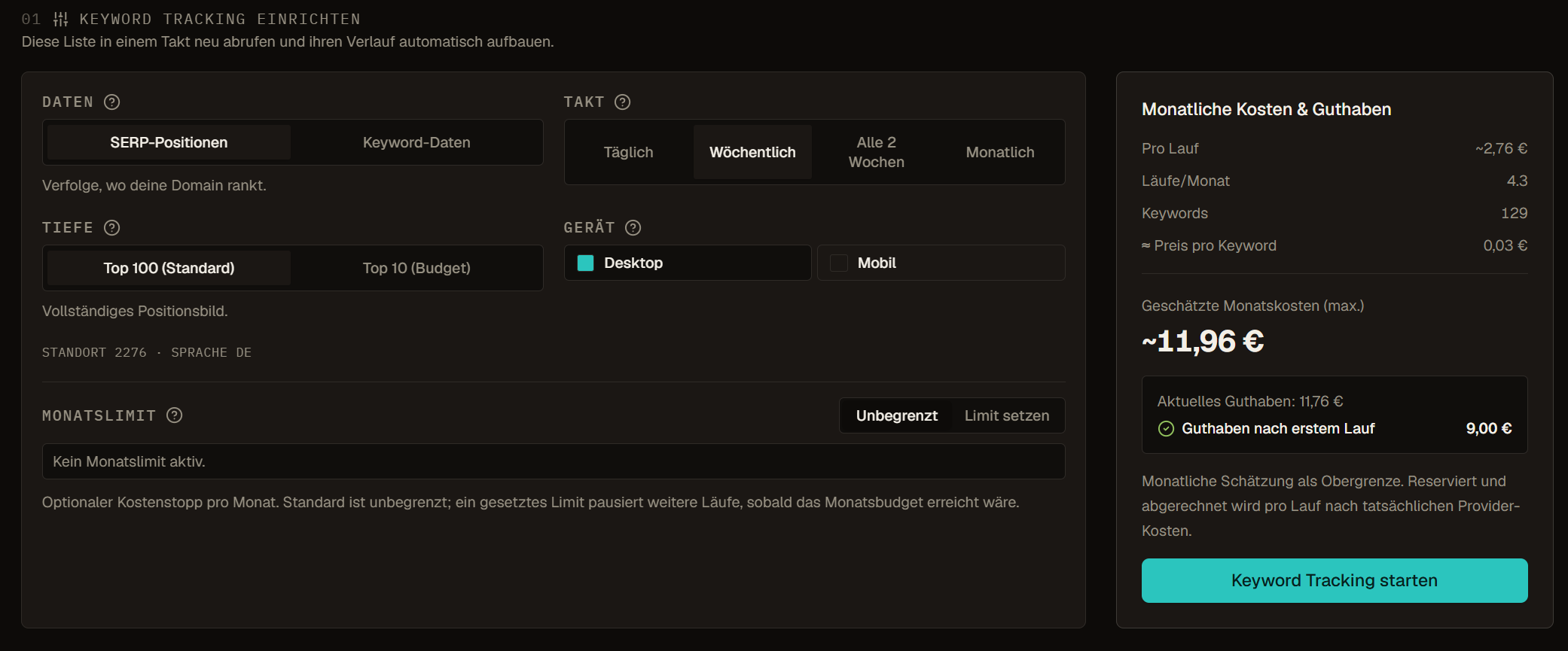
For SERP tracking, choose the keyword cohort, location, language, one or both supported devices, top-10 or top-100 depth, and cadence. SERP schedules support daily, weekly, every two weeks, or monthly runs. A separate keyword-data schedule can refresh selected data packages monthly or quarterly because those fields do not need a daily position cadence.
The form estimates cost per run and average monthly cost from the current cohort, devices, depth, packages, and cadence. It also shows current balance and can apply an optional monthly budget cap. An unlimited cap is not unlimited balance, and an estimate is not the final charge. Confirm the configuration again after changing list size or adding a second device.
- Use the correct own domain and market context before the first baseline.
- Choose top 10 when page-one presence is enough for the decision and top 100 when deeper absence matters.
- Track desktop and mobile separately within the schedule when both contexts matter.
- Name list-backed cohorts by purpose, market, and review owner.
- Set a budget cap from the expected review value, not from the maximum the slider allows.
- Create duplicate contexts deliberately; matching active schedules are rejected as duplicates.
Before making the observation recurring, review tracking schedules and costs for the intended keyword cohort.
Creation, manual runs, cadence, and lifecycle are separate controls
Creating a schedule stores a future next-run time and the interface starts the initial baseline through the manual run path. Later recurring runs are claimed on the configured cadence. Run now requests the normal priced queue, while SERP schedules can offer a separately estimated faster queue for that single run. A click can still produce no run when the schedule is inactive, already running, over budget, or short of balance.
Pause stops future claims without destroying the schedule. Resume returns it to active operation. End archives it and removes it from ordinary dispatch. Editing cohort, cadence, devices, depth, packages, or cap changes future runs, not the immutable requested count of a run already claimed.
Read the tracking dashboard within its aggregation mode
The list dashboard can summarize current distribution, average position, movement, and available history. For lists up to the supported historical threshold, it can aggregate stored per-keyword snapshots. Larger lists use a current projection from denormalized position fields so the read remains bounded rather than scanning every historical row.
The interface identifies that current-projection mode. Do not present it as a full historical rollup. Compare the same cohort and context across reports, disclose missing coverage, and open the keyword timeline when an aggregate movement needs an explanation.
Balance and run outcomes are part of the measurement
Each claimed paid run reserves the estimated balance before worker execution. Completed keyword results settle against real provider cost, and unused reservation is released. A multi-device schedule can create separate child runs under one logical group. No-data, partial, failed, balance-skipped, and dispatch-skipped outcomes remain different states.
The run log records requested and fetched counts, terminal state, time, and settled cost where available. A zero charge can mean no billable data was returned, not that the schedule itself is free. Repeated failures or balance problems can pause operation, so investigate the ledger before assuming the next displayed date guarantees a successful run.
Activity and the run log prove execution, not the button click
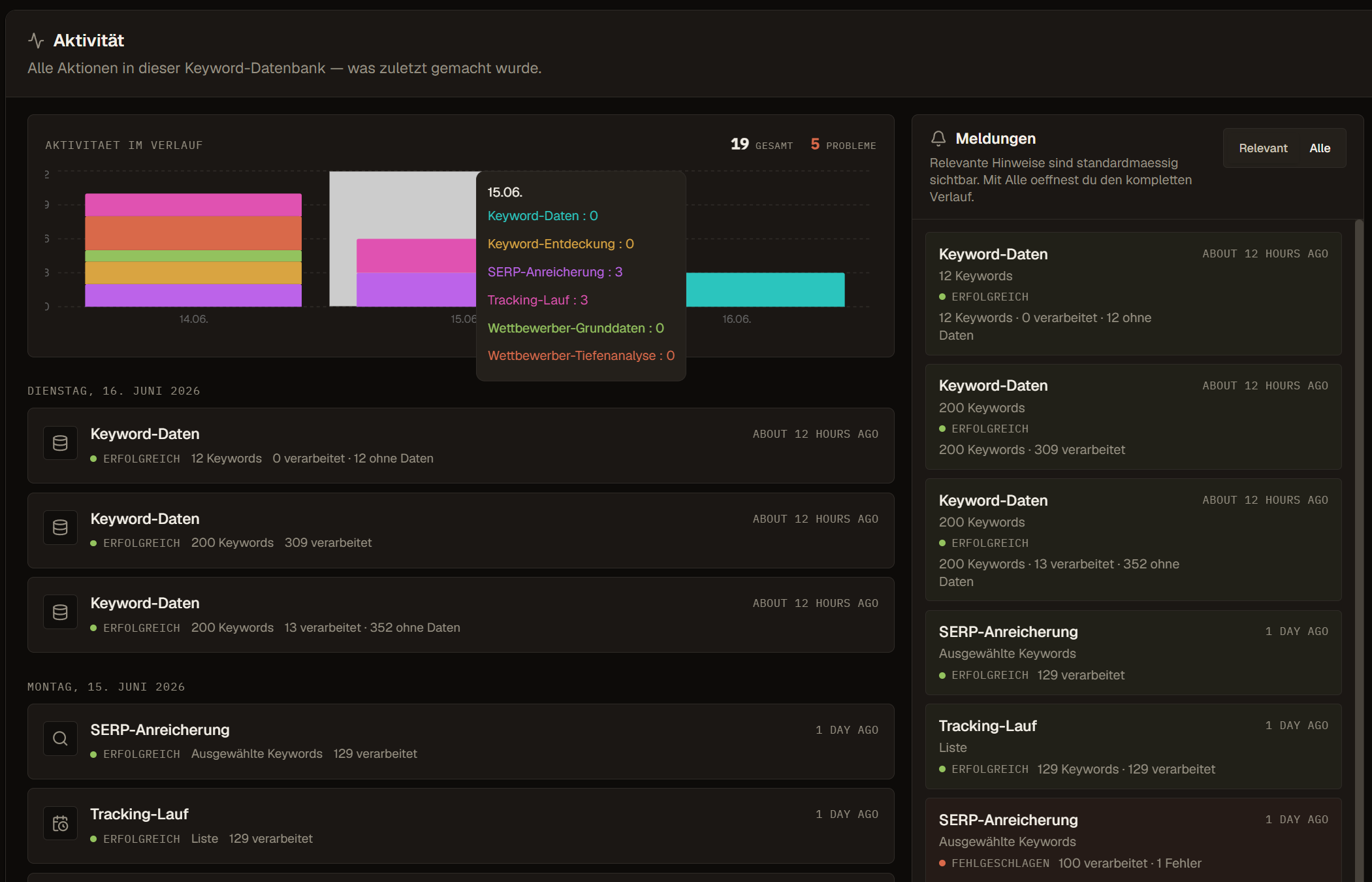
Use Activity for SERP enrichments and competitor operations, and use the tracking run log for schedule-level outcomes. Check action, initiating scope, start and finish time, requested rows, successful rows, no-data rows, failures, cost, and visible error code. Queued or running is not complete, while partial is not the same as total failure.
If a value appears unchanged, first confirm that the relevant job finished and that the row was inside its claimed scope. Then compare source and data date. Repeating the whole operation before that check can spend balance twice, overwrite useful current context, or hide the original failure behind a later run.
A practical review from snapshot to controlled tracking
Example: From shortlist to weekly tracking
A team requests SERP snapshots for a reviewed shortlist to see which page types rank and whether its own domain appears. One competitor domain shows up across many of the terms.
The team opens that domain in the competitor dossier, then creates a weekly tracking schedule for the shortlist on desktop and mobile. The form shows the cost per run and the average monthly cost before the schedule is saved.
Frequently asked questions
Are SERP features fetched automatically for every keyword?
No. SERP data is requested on purpose for selected keywords. Features such as AI Overview, Featured Snippet or People Also Ask are recorded for that snapshot and its market, language and device.
Which delivery modes are available for SERP requests?
Live, Priority and Standard return current results and trade delivery time against cost. Historical mode requests monthly observations for 3, 6, 9 or 12 months and writes position history.
How often can rankings be tracked?
SERP tracking schedules run daily, weekly, every two weeks or monthly, for desktop, mobile or both, at top 10 or top 100 depth. Keyword data refreshes can run monthly or quarterly.
What happens when I add keywords to a tracked list?
A list-based schedule uses the list membership at the moment a run starts, so new terms join the next run. A run already in progress keeps its original scope.