
Keyword metrics explained
Before comparing figures, select a consistent keyword scope and set of columns so the numbers describe the same working set.
Source and definition
Date and missing state
Decision boundary
Keywords
Keywords is a count of normalized keyword records in the scope named by the surface. That scope may be the workspace, a list, the current filtered result, the loaded page, or an explicit selection. Read the label beside the number before using it in a report or cost estimate.
The inventory total can be larger than the rows currently loaded into the table. A selected count can also differ from the visible count after filters, exclusions, or Select all matching. Confirm the action scope in the relevant control instead of assuming every number on the page refers to the same set.
Volume
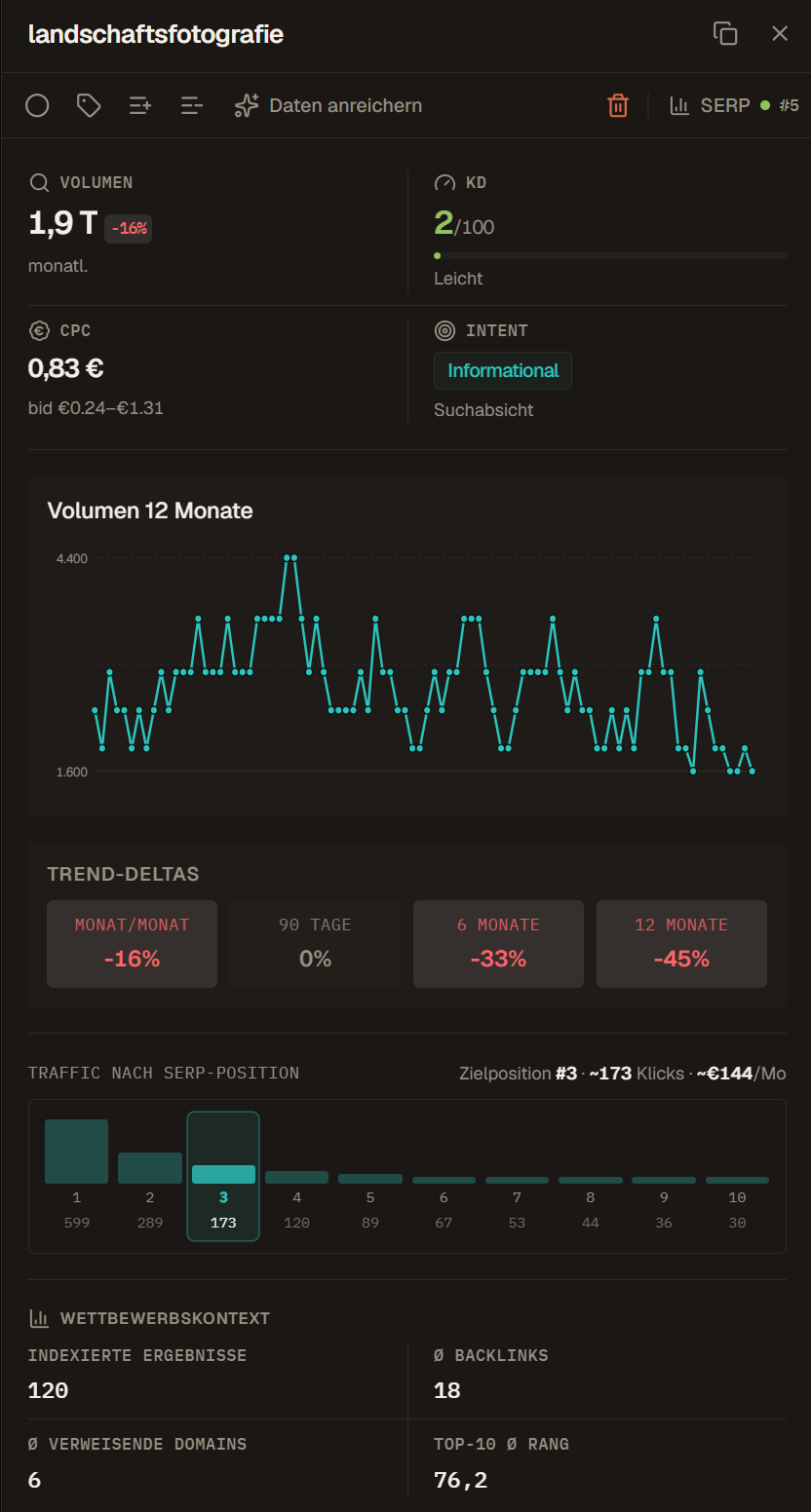
Volume is an external estimate of average monthly searches for the requested keyword, location, and language context. It describes search demand, not visits to your site. An absent value means the current record has no usable estimate; it must not be converted to zero.
Use Volume to compare terms collected under compatible market settings and data dates. It can be rounded, delayed, seasonal, or sparse for long-tail queries. Pair it with the monthly series, intent, SERP evidence, and business relevance before deciding whether the demand matters.
KD
KD is the provider's Keyword Difficulty estimate on a 0 to 100 scale. It models the relative difficulty of reaching the organic top 10 from the provider's available search and link evidence. A recorded zero is a real value; a dash means the value is unknown.
KD is not a probability of ranking, an effort estimate, or a verdict on page quality. Check the actual result pages, search task, link profile, site relevance, and the date of the metric. Scores from different providers are not interchangeable unless their definitions and source data match.
CPC
CPC is the stored paid-search cost-per-click estimate for the keyword. It reflects historical advertising data in the requested market and can indicate advertiser demand. It does not report what your account paid and does not measure organic conversion value.
Treat the displayed currency value as directional product data, not an invoice or media plan. Confirm provider currency, collection date, match context, campaign settings, and your own conversion economics before using CPC in budget work. A high CPC can coexist with poor organic fit.
Chances
Chances is a Crawl Foundry table heuristic calculated from stored Volume and KD. Higher demand increases the value, while higher difficulty reduces it. If either input is missing, the score remains unknown. Intent, current ranking, SERP layout, business value, data freshness, and content fit are not part of this formula.
Use the number to sort or open a shortlist for review. It does not choose a target page, prove that content is missing, approve an action, or predict growth. A lower-scoring term can still be the better decision when the search task or customer value is more specific.
Intent
Intent is the provider-classified main search intent: informational, navigational, commercial, or transactional. A confidence value or secondary intents may be available on the record. The label describes a likely search task, not a fact about every person who enters the query.
Inspect the current SERP when page type or message depends on intent, especially for mixed or ambiguous terms. Intent can inform the editorial discussion, but the team still chooses the target page, claims, format, conversion path, and whether the keyword belongs in the project at all.
Month-over-month change
Month-over-month change is the percentage difference between the two newest usable points in the monthly search-volume series. It remains unknown when the series is too short, a value is invalid, or the earlier month is zero because a percentage change would not be meaningful.
One monthly movement can reflect seasonality, reporting lag, a temporary event, or ordinary estimation noise. Read the underlying series and its market before treating the sign as a durable trend. Do not use this field as a ranking or traffic change.
12-month volume sparkline
The sparkline plots the available monthly search-volume points in compact form. It is useful for noticing recurring peaks, sudden spikes, plateaus, and direction, but it hides exact values and may contain fewer than twelve usable months.
Open the keyword detail or compare the stored points before scheduling work around a visual pattern. A seasonal peak describes query demand in the selected market; it does not show when your page will rank or how much traffic it will receive.
Trend columns
The visible trend columns compare the newest monthly volume point with an earlier point over roughly 3, 6, or 12 months. The former 30-day trend duplicated month-over-month movement and is no longer shown as a separate column. These fields measure search demand, not positions.
If the stored history is shorter than the requested window, the table can compare against the oldest available point and mark the result as approximate. Read that span before comparing keywords. A stable evergreen term can remain valuable even when none of the trend filters select it.
Competition and Competition Index
Competition is a provider category for relative advertising pressure in paid search. Competition Index is its numeric representation, based on available ad inventory and advertiser participation for the requested market. The table may show a category, a percentage-style value, or neither when data is absent.
This is not organic Keyword Difficulty. A query can have high paid competition and an accessible organic result set, or the reverse. Use the field with CPC and bid information when commercial pressure matters, then inspect KD and the SERP separately for organic work.
Top-of-page bid range
Bid range contains the available lower and upper top-of-page paid-search bid estimates for the keyword and market. The table shows a range when both endpoints exist and a one-sided bound when only one is available.
These values describe historical market estimates, not the bid required for your account or a guaranteed placement price. Auction conditions, targeting, quality, currency, and date still matter. Use the range as commercial context, not as an SEO return forecast.
SERP result count
SERP result count is the stored search engine estimate of results associated with the query. It belongs to a particular SERP observation and can be very large, approximate, stale, or absent. It is not a verified count of distinct indexable pages.
Do not treat a larger result count as proof of harder competition. The composition and quality of the observed top results are more useful for page decisions. Check the SERP data date before using the number as background context.
Average backlinks
Average backlinks is the provider's mean backlink count across the organic pages in the observed top 10. It summarizes the result set rather than your page. A few heavily linked results can raise the average, and the value depends on the provider's link index and update date.
Read it with average referring domains and the actual ranking URLs. Raw link volume does not show link quality, topical relevance, acquisition pattern, or whether links caused the rankings. Use it to frame a review, not to set a backlink quota.
Average referring domains
Average referring domains is the mean number of distinct linking domains across the observed organic top 10. It reduces the effect of repeated links from one domain, but it remains an aggregate from the provider's current link index.
Compare it only across compatible snapshots and markets. A lower number does not make a keyword easy, and a higher number does not tell you which domains or links matter. Open the ranking pages and link evidence when the decision depends on authority.
Top-10 average link rank
This field is the provider's average link-rank value for the websites in the observed organic top 10. The internal field name is topTenAvgRank, but the value is not the average Google position of those results and not your domain's ranking position.
Use it as one compact description of the link strength in that result set. Its scale and calculation belong to the external provider, so do not compare it with a domain-authority metric from another product. For your own current position, use the Position fields.
Data Health
Data Health is a Crawl Foundry score from 0 to 100 that asks whether the row is complete and fresh enough to support a decision. It combines available keyword fields and their freshness, SERP evidence, own-domain and tracking basis, and competitor context. The score can change when those inputs are added or age.
High Data Health means the row has a stronger evidence basis, not that the keyword is attractive or rankable. Low Data Health points to missing, old, inactive, or unavailable context. Read the reason and data dates before deciding whether a paid refresh is justified.
If missing or old fields could change your decision, review when a paid refresh is useful before requesting more data.
SERP Dynamics
SERP Dynamics is a Crawl Foundry score from 0 to 100 derived from repeated top-10 snapshots. It combines domain turnover, position movement among retained domains, changes at rank one, and changes in observed SERP features. A score requires at least three usable snapshots spanning at least seven days; otherwise the state is unknown.
Scores up to 30 are classified as stable, values through 70 as moving, and higher values as volatile. Volatile does not mean easy or valuable. It means the observed result set changed more and deserves closer inspection before a page, forecast, or report relies on it.
To inspect the search results behind a signal, continue with SERP evidence and competitor analysis.
Visibility and Visibility Index
Per-keyword Visibility estimates monthly organic clicks for the configured own domain by multiplying stored search volume by a fixed click-through-rate curve for positions 1 through 10. With a known volume and own-domain context, a result outside that page-one range contributes zero. Without the required basis, the value stays unknown.
The aggregate Visibility Index is the sum of known estimated clicks in the selected keyword set divided by 1,000. It is not analytics traffic and not a global market index such as a suite-wide visibility metric. Read scope and confidence coverage before comparing two lists or dates.
Position
Position is the latest stored organic position for the configured own domain in the available SERP context. It belongs to a particular keyword, domain, market, device or search context where supported, and collection time. A dash can mean no measurement, no match within the acquired depth, or unavailable context; it is not position zero.
Confirm the tracked domain and SERP context before comparing positions. Search personalization, location, result features, collection mode, and snapshot date can all affect the observation. Position alone does not identify the page change or cause behind a movement.
For changes across measurement dates, use the guide to ranking rows and position trends.
Position change
Position change compares the current stored observation with the preceding usable observation in the same supported context. Because a lower position number is better, read the displayed direction and the two dates rather than assuming a positive arithmetic delta always means improvement.
A single change may come from ordinary SERP volatility, a different ranking URL, a measurement gap, or an actual performance shift. Check Position Trend, SERP Dynamics, the observed URL, and the underlying snapshots before assigning a cause.
Position trend
Position Trend is the recent shape of the stored rank observations for the keyword and configured domain context. It helps distinguish a one-point jump from a sequence of gains, losses, gaps, or reversals.
The line is only as complete as the acquired snapshots. Missing days are not automatically unchanged positions, and a visual direction does not prove that a publication or technical change caused it. Connect the points to tracking runs and dated events before drawing conclusions.
Historical position deltas
The 3, 6, 9, and 12-month position fields compare the current observation with an available historical point near the named lookback. A missing historical basis remains blank. These deltas belong to the stored domain and SERP context, not to every location or device.
Use the fields for bounded retrospectives and to find keywords that deserve a closer timeline review. They do not establish content decay, recovery, or campaign impact by themselves. Verify comparable snapshots, ranking URL changes, and relevant releases or site events.
SERP features
SERP Features records supported result modules detected in a requested SERP snapshot, such as AI Overview, Featured Snippet, People Also Ask, Local Pack, image, video, shopping, knowledge, news, jobs, or other supported types. The field is opt-in data; it is not fetched automatically for every keyword.
Presence describes the observed snapshot, not guaranteed ownership or click impact. Features can appear, disappear, or differ by market and device. Check the snapshot date and actual result layout before changing a page or estimating organic click potential.
Categories
Categories are external classification identifiers attached to the keyword data when available. The compact table shows how many are present rather than translating them into a team taxonomy. Older, manual, or unsupported rows can have none.
Use categories for rough provider context or an audit of available metadata. They do not assign campaign, owner, page type, or editorial status. Use workspace tags or lists for classifications the team needs to control and explain.
Detected language and country
Language and country are distinct fields. Detected language describes the language inferred for the keyword when available. Country records the market context stored with the keyword data. Either field can be missing, and detected language can differ from the language requested for collection.
Show both when a list mixes markets or when wording is shared across countries. Do not merge rows or compare demand only because the phrase is spelled the same. The SERP, monthly volume, ads context, and user task can differ by market.
Daily ad cost estimate
Ad Cost comes from the provider's daily advertising cost range for the keyword when impressions information is available. The compact column shows the available upper endpoint, falling back to the lower endpoint. It is not actual spend from your advertising account.
Use it only as paid-market context. Confirm the underlying minimum and maximum, currency, market, source date, targeting, and your own campaign economics before budgeting. The estimate is separate from Crawl Foundry Balance and from the cost of requesting data.
Daily ad impressions estimate
Ad Impressions comes from the provider's estimated daily impressions range when that data is available. The compact column shows the upper endpoint when present and otherwise the lower endpoint. It does not report impressions from a connected advertising account.
Treat it as an external paid-search estimate for the requested market and date. Do not compare it directly with organic Volume, Search Console impressions, or campaign reporting without aligning definitions, targeting, time range, and source.
Status
Status is the shared workspace Kanban column currently assigned to the keyword. Column names are configurable, and a keyword without an assignment appears in the backlog or no-status state used by the current surface.
The field records a team label, not completion evidence. Published does not verify a live URL, Review does not assign a reviewer, and Tracking does not create a schedule. Keep deadlines, approvals, publication, and measurement in the workflows that own them.
Source
Source describes how the keyword entered the workspace, for example manual entry, CSV import, research, autocomplete, discovery, or competitor work. A record can also carry several source-session references after the same normalized term appears more than once.
This provenance does not by itself identify the source or date of every metric now attached to the row. Use Source to investigate origin and duplicates, then read the specific data timestamp, SERP snapshot, tracking run, or competitor operation for the evidence layer in question.
First seen
First seen is the earliest stored time when the normalized keyword became part of the workspace inventory. Later imports or research runs can add source context without replacing that original timestamp.
Use it to separate older inventory from recently added records and to audit handoffs. It is not the date the query became popular, the date a page was published, or proof that the team first discovered the topic then.
Keyword data date
Data date is the timestamp of the latest stored keyword-data fetch for the row. It helps judge the freshness of Volume, KD, CPC, intent, monthly history, and other fields supplied by that request. Imported or manually added rows can have no such timestamp until data is requested.
Do not use this one date for every evidence layer. SERP snapshots, competitor analyses, rank observations, score computations, and imports can have separate timestamps. Check the date attached to the field that drives the decision before paying for a refresh or publishing a report.
Example: Comparing two candidate keywords
Two keywords compete for the same content slot. The first has higher search volume, but its keyword difficulty is high and the SERP is full of marketplaces. The second has lower volume, matching intent and a result page with guides similar to what the team can publish.
Chances ranks the first keyword higher because it only combines volume and difficulty. The SERP check and intent make the second one the better choice. The metrics start the review; they do not end it.
Frequently asked questions
What does keyword difficulty (KD) mean in Crawl Foundry?
KD is the data provider's estimate on a 0 to 100 scale of how hard it is to reach the organic top 10. A recorded zero is a real value, a dash means unknown. It is not a probability of ranking.
Why is search volume empty for some keywords?
An empty volume means the record has no usable estimate yet or none exists for that market. It must not be read as zero searches; request data or check the market settings.
How is the Chances score calculated?
Chances is calculated from stored volume and keyword difficulty: more demand raises it, more difficulty lowers it. Intent, current ranking, SERP layout and business value are not part of the formula.
What do Data Health and SERP Dynamics show?
Data Health, from 0 to 100, shows whether a row is complete and fresh enough to support a decision. SERP Dynamics, also 0 to 100, measures how much the top 10 changes; it needs at least three snapshots over at least seven days.