
Diagnose the state before you retry the action
When an operation looks stuck or incomplete, use Activity troubleshooting to preserve its status and supporting evidence before retrying.
Scope first
State over spinner
Safe evidence
Preserve the state before trying to fix it
Wrong scope is the first thing to rule out
Many empty or surprising screens are valid results for the wrong organization, workspace, project, domain, country, language, list, device, date, or saved view. Clear search and filters, but also read the surrounding scope labels before concluding that data disappeared.
Do not move data or loosen permissions until you have reproduced the issue in the intended scope.
Loading, empty, and stale are three different states
| State | What to check |
|---|---|
| Loading | Whether the request is still active, whether the source run exists, and whether the worker has actually started. |
| Empty | Scope, filters, prerequisites, source coverage, and whether any eligible record exists. |
| Stale | Source date, last successful run, schedule history, comparison baseline, and whether a newer run published its results. |
Use Activity as an index, then diagnose in the owning product
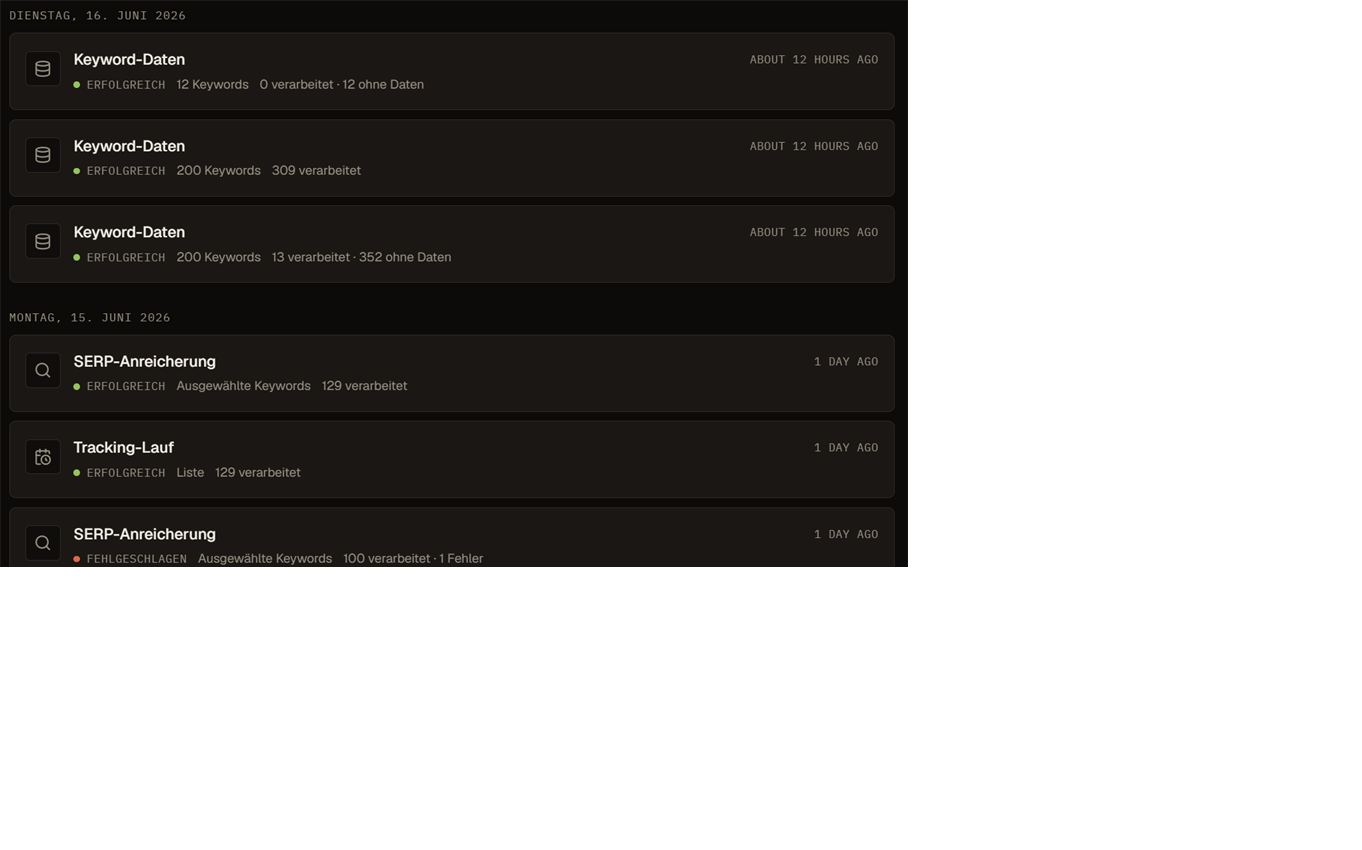
Activity can connect a supported operation to its normalized status, scope, counters, initiator, support code, destination, and billing evidence. Its 30-day or 90-day dashboard, 365-day calendar, source reads, and 100-row timeline are bounded. A missing Activity row is not proof that no product action occurred.
Activity cannot cancel, resume, retry, repair, or publish a run. Follow the destination and inspect the source product's current state and output before taking action.
A saved request is not proof that background work ran
For queued or long-running work, separate request acceptance, dispatch, worker start, provider response, persistence, and publication. A successful submit response proves only the contract that response describes.
Before retrying, check whether another run is active, whether the original owns a reservation, whether output was partially persisted, and whether the product provides a supported recovery action. Repeated retries can duplicate cost or make the evidence harder to read.
Partial, capped, sampled, and lower-bound results remain usable with limits
- Read the coverage or limit label before comparing counts.
- Do not treat rows outside a returned page as zero.
- Compare runs only when scope, rule version, market, device, and coverage are compatible.
- Exported rows can reflect only the loaded or returned subset.
- A spend value marked as at least is not a complete financial total.
Hidden data, denied actions, and insufficient balance need different responses
A missing control can result from a capability, organization role, workspace assignment, project assignment, plan, or feature gate. Ask an administrator to verify the exact capability and resource scope rather than granting a broad role by guesswork.
Billing data hidden from a viewer is not zero. When a metered action is blocked, check usable balance, estimate or reservation state, source run, and the payment history separately.
If the request cannot start because of balance or billing access, check billing and usage before repeating the operation.
For imports and exports, prove the row set
Retry only when the current state supports it
| Observed state | Safer next move |
|---|---|
| Validation or prerequisite error | Correct the input, access, verification, market, or setup before starting new work. |
| Queued or running | Inspect dispatch and worker ownership; avoid creating a duplicate run. |
| Partial | Preserve useful output, identify the missing subset, and use the product's documented continuation or retry path. |
| Failed or cancelled | Read support code, billing disposition, and source recovery controls before retrying. |
| Succeeded but output looks wrong | Audit scope, coverage, source date, transformations, and publication instead of rerunning immediately. |
Escalate with a reproducible, safe record
- Organization, workspace, product route, resource name, and browser time zone.
- Action attempted, expected result, actual result, and whether it can be reproduced.
- Source run ID or visible operation identity, timestamps, status, counters, and support code.
- Coverage, cap, filter, market, language, device, and date context.
- Billing state or provider order reference when relevant, without tokens, secrets, card details, or private customer data.
Example: An empty keyword table
A user sees an empty keyword table after an import. Before retrying, they check the workspace, the active list and filters, then open Activity.
Activity shows the import as still running. Once it finishes, the rows appear, and a second import that would have created duplicates is avoided.
Frequently asked questions
What should I check first when data is missing?
The scope: organization, workspace, project, domain, market, language, list, filters and date window. Many empty screens are correct results for the wrong scope.
When is it safe to retry an action?
After a validation or setup error has been corrected, or when a run has a final failed state. Do not retry while a run is queued or running, and retry only the missing part of a partial run.
What should a support request include?
Organization, workspace, route, the action you tried, expected and actual result, run ID or operation, timestamps, status and the support code exactly as shown.